Back to current statement

August 2025

Jack Henry Rapid Transfers™ now available! • New JHA Treasury Management™ features • Introducing Jack Henry Identity • Banno Business™ updates • Plus more

Making the Grade – and the Upgrade!

As the dog days of summer fade and the back-to-school buzz kicks in, we’re trading sunscreen for sharpened pencils – and a sharpened focus on delivering value. This month, we delivered multiple features, and there are a lot more in the works. The summer may be ending, but our commitment never takes a break. Take a look at what we have coming up to learn more!

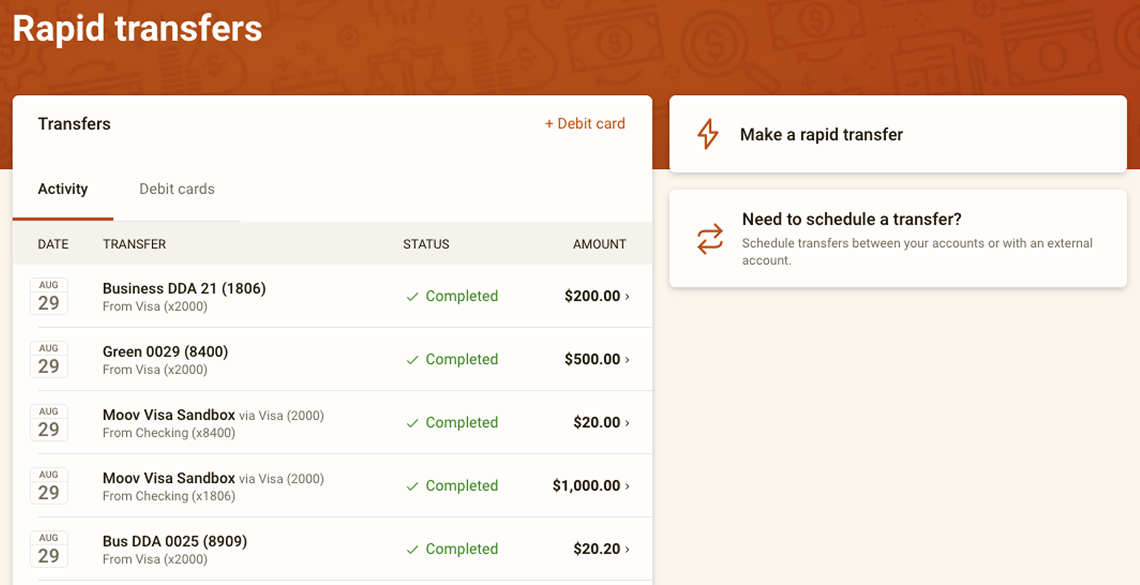
Screenshot of the 'Rapid Transfers' screen.
New Feature • Banno Platform™

Jack Henry Rapid Transfers™ is now available!

After months of preparation and anticipation, it's official – Jack Henry Rapid Transfers, powered by Mastercard Send and Visa Direct, has passed beta testing and is now widely available! Your end users, whether retail or business, can now manage their real-time “Me-to-Me" money movement needs in a flash with Jack Henry Rapid Transfers.

How it works

On the Banno Platform, cardholders can link an external debit card to push or pull funds instantly for a range of purposes, like consolidating balances from digital wallets, funding a newly opened account, or good olʼ fashioned cross-institution transfers!

In other words, rather than waiting days for such transfers to process over traditional ACH rails, Jack Henry Rapid Transfers empowers your debit card holders to complete Me-to-Me transfers in mere seconds, letting them solve immediate access needs, well, immediately.

How to enroll

If your financial institution hasn't already enrolled with Moov, our partner vendor, you'll need to do so before you can offer Jack Henry Rapid Transfers. To get enrolled, complete these steps:

  1. Review your core-specific pre-work using the Compliance & Onboarding guide for your platform – CIF 20/20, SilverLake, or Symitar.
  2. In Banno People, open the Settings menu, select Transfers, and then open the Rapid Transfers tab.
  3. Click Request Moov enrollment to generate your personalized onboarding link and begin the process.

No additional contracts or support tickets are required; however, should you run into any roadblocks or questions, our support team is happy to help!

For additional details, check out the Jack Henry Rapid Transfers doc on the Knowledge Base.

Coming Soon • Banno Business for Banks • Banno Online & People

Banno Business Reports

After several months of beta testing and refinement, we’re pleased to announce that our Banno Business banks will soon have the option to configure and enable Banno Business Reports. When enabled, business users will have access to numerous business reports (matching what's available in Cash Management) with the enhanced Banno experience:

  • Activity
  • Current day and Prior day
  • Electronic Data Interchange (EDI) transactions
  • Positive pay
  • Summary

In early October, we'll enable your ability to turn Reports on for your business customers. We'll be sending an additional SLA when reports are enabled for you to configure. The configuration is identical to that in CCM and completed in NetTeller Back Office, we recommend setting the Show Transaction Reports entitlement to "For All CCM NT IDs".

Once things are configured in Back Office, enabling the feature for a business and its users is as simple as toggling the permission in Banno People! If you prefer to manage access to reports directly, once the feature is released, you can jump in and self serve. If you'd like us to enable for all of your businesses and business users, send an email to digitalscheduling@jackhenry.com.

While this feature requires no additional contract, an authorized administrator from your bank will need to complete the setup in both Banno and the NetTeller Back Office, as further detailed in this Banno Business Reports documentation on the Knowledge Base.

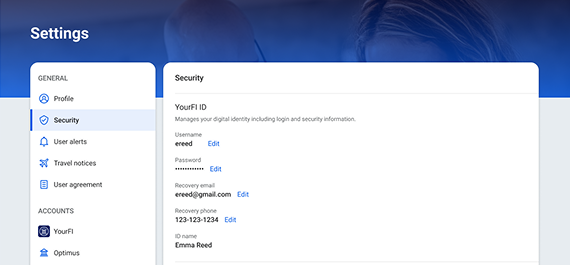
Screenshot of the Security screen for the upcoming, separate identity profile.
Coming Soon • Banno Platform & JHA Treasury Management™

Separate identity profiles for Banno and Unified Identity Service

To best support the new Retail Organizations project, as well as support our Unified Identity Service users, we are reconfiguring our existing Profile and Security screens for Mobile and Online. This will allow end users to view and edit Banno-specific details separately from their identity and recovery information.

A key enhancement is the introduction of Recovery Email, Recovery Phone, and ID Name settings within Mobile and Online screens, separate from core or product-specific details. This allows for distinct contact information for account recovery and security versus alerts and notifications. Be on the lookout for these additional fields to be released – in Banno and Treasury Management ‐ in mid-October!

Coming Soon • Banno Platform & JHA Treasury Management

Jack Henry Identity crisis priceless

What's the oppositie of an identity crisis? Well, our handy thesaurus wasn't much help with finding the perfect antonym, but as we work to integrate Jack Henry Identity into the Banno Platform, Jack Henry Platform, and beyond, we think you'll agree that the positive impact and streamlined authentication processes are invaluable!

Jack Henry Identity at glance

Meet Jack Henry Identity – our new, centralized Identity Provider (IdP) Platform service. Soon we will implement Jack Henry Identity for additional Jack Henry products, adding more over time, until our new IdP lets us provide a universal entry point (complete with universal credentials) to Banno Admin, Jack Henry Platform, and all your Jack Henry back-office products!

Built with preeminent industry standards, such as OAuth 2.0 and OpenID Connect (OIDC), Jack Henry Identity ensures the highest security protocols for authentication. In other words, it will let your staff securely, conveniently access Banno People™, Banno Support™, Banno Marketing™, and other apps within Banno Admin as well as key products we offer separately from Banno.

First on the implementation list

Jack Henry Identity is growing up! As solutions like LoanVantage™ and JHA OpenAnywhere™ (along with Banno Platform) work to implement Jack Henry Identity as their go-to authentication solution, your Banno Admin users will see new groups added for these additional products.

It’s exciting to see Jack Henry Identity being used outside of our Digital organization, so let your admins know that new, non-Banno groups are expected as more Jack Henry solutions adopt Jack Henry Identity.

Banno Admin login redirect

As discussed during the August 8 Digital Banking Meetup, we are set to migrate Banno Admin Authentication to the new Jack Henry Identity platform on October 27, 2025, at which point your staff will see the current Banno Admin login URL (https://banno.com/a/login) redirect to the Jack Henry Identity login URL (https://login.jackhenry.com). Upon successful login, they will then be automatically redirected to Banno Admin, where they will continue working as normal – with the same level of access that they have today.

It's important to note that if a user navigates directly to https://login.jackhenry.com rather than starting from https://banno.com/a/login, they can authenticate successfully; however, they will get redirected to their own Jack Henry Identity Profile and Security screens instead of getting automatically redirected to Banno Admin, like they will if they start at https://banno.com/a/login. This behavior will hold true for any product-specific login URL.

Stay tuned for a follow-up SLA with more details.

Banno Admin session logouts

To fully sign out and end your session, you'll see a new Banno Session Logout screen after you sign out of Banno. This change is being made because signing out of Banno does not automatically sign you out of your Jack Henry Identity (JHID) session. To ensure a complete logout, you must also close your browser.

This new screen will guide you through the process, providing a consistent and secure experience across our platforms. The sign-out process for Banno Admin will not change.

New Feature • Banno Mobile & Online

Anchor device verification

Now that we've had several customers using anchor device verification for a few weeks, we've begun the process of enabling it for everyone. We are working behind the scenes to designate anchor devices and get this configured in preparation of releasing the new setting for all institutions in September, after Jack Henry Connect!

Heads Up • Apps

🎗️Forget-me-nots🎗️

With Jack Henry Connect around the corner, we won't have our usual events next month. But you can save your seat for the next round now:

Stay in the know!

To receive SLA emails for all things that matter to you, please head to our Subscription Manager and subscribe accordingly. Please also spread the word with your colleagues, so your whole team gets the respective SLAs that matter to each of you!

Heads Up • Banno Digital Toolkit™

Toolkit Corner: Typical Auth Flows - Client Credentials Flow

When it comes to securing server-to-server communication, the OAuth 2.0 Client Credentials Flow is a trusted standard for backend authentication.

It’s purpose-built for scenarios where no user is involved – like automated jobs, system-level integrations, or privileged API access between trusted applications.

This flow eliminates the need for user credentials altogether, relying instead on signed JWTs and secure key pairs to authenticate and authorize access.

Explore the guide to understand how it works, when to use it, and how to implement it with poise and precision.

Upcoming Webinar • Banno Platform

Unlock Real-Time Money Movement – Upcoming Webinar with Visa Direct

We’re hosting a webinar with Visa to show how Jack Henry Rapid Transfers™ is transforming real-time money movement. This session will explore how Jack Henry Rapid Transfers – enabled by Visa Direct – can help financial institutions meet rising consumer expectations for fast, seamless payments.

Stay tuned for registration details!

New Feature • Banno Business™ for Banks • Banno Online™

Business alerts for banks

As announced in the SLA sent on August 19, all Banno Business banks (SilverLake and CIF 20/20 cores) will be migrated to native Banno Business alerts by September 30 October 7*, and the migration has already been successfully completed for many of our early adopters. For those of you we haven't converted yet, we will send one last SLA letting you know the specific migration date for your institution.

*Note: This date is 1 week later than the completion date we’ve communicated previously. With Jack Henry Connect 2025 happening September 8 - 11, we have decided to push back the migration schedule by 1 week (for each wave of institutions) to ensure that our digital banking leadership team is available to oversee a smooth transition. [This note was added on September 5.]

Once your bank has been migrated, your business users can set up alerts for a variety of activities such as ACH, Wires, and Positive Pay exceptions, all in one convenient place.

Additionally, retail users at banks with Banno Business will also have access to new alerts, such as notifications for insufficient funds, loan matured, and incoming ACH credits and debits. This means your customers can customize their notifications for important financial activities and stay informed directly through Banno.

For a refresher on the details of our Business alerts migration for Banno Business banks, see our Banno Business alerts FAQ.

Reminder: All Banno alerts are now sent over the Enterprise Notification System (ENS), our centralized platform that provides additional security and paves the path for future enhancements such as Rich Communication Services (RCS) messages.

Coming Soon • Banno Business for Banks • Banno Mobile™ & Online

Updating business user details

Something special is on the horizon for our Banno Business customers on SilverLake and CIF 20/20 cores! Soon, business users will be able to update their own digital banking username, email address, and phone number directly within Banno without needing to contact your bank personnel. This will give your business users more control over their personal information and reduce the number of support tickets for your team. It looks like things are about to get a little easier.

Important: If your bank is already live with Banno Business alerts, please be aware that your business users have already been granted the ability to edit their email address and phone number.

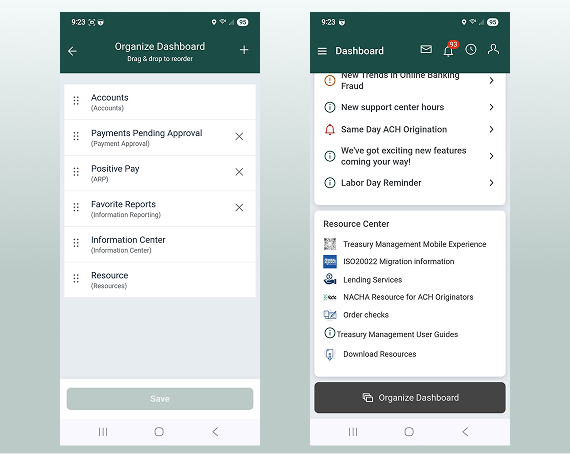
Screenshots of customizable Treasury Management dashboard.
New Feature • JHA Treasury Management

Customizing the Treasury Mobile Experience dashboard

Your end users have an exciting new feature available on the Treasury Mobile Experience! Now they can add, remove, and specify placement of their widgets on the Dashboard. Just a quick tap of the Organize Dashboard button at the bottom of the screen will open the config where users can tap & hold, then drag & drop widgets to their preferred location. Tapping the plus sign will allow users to add additional available widgets.

Coming Soon • JHA Treasury Management

Treasury Mobile Experience in the app stores

Soon, you'll be able to request that the Treasury Mobile Experience be made available in the app stores! This gives your Treasury app the common presence users are accustomed to, allowing for intuitive downloading and access. Even though present in Google Play (Android) or App Store (Apple), it is still a progressive web app, meaning once downloaded it will not require updates for new features or fixes.

Look for an SLA with more information on the request process!

Heads Up • JHA Treasury Management™

Important Updates for Passkey with Treasury Mobile Experience

Impactful updates have been made to the use of passkeys with Treasury Management! Users can now authenticate with a passkey without having to first enter their username.

Information on this change is available on the Treasury Management site in the ForClients Portal.

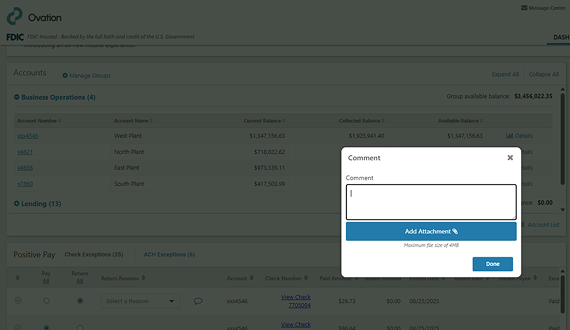
Screenshot of the 'Add Attachment' dialog for Positive Pay check exceptions.
New Feature • JHA Treasury Management™

Now Available! Positive Pay Check Exception Attachments in Treasury Management

Users can now add attachments to comments for check exceptions as well as correction forms. Banks have the ability to see attachments added to comments via the Positive Pay Check Exceptions back office report. Attachments added to correction forms can be viewed by the bank in the Message Center.

For more information on this new enhancement, check out the Quick Reference Guide on the Knowledge Base.

Follow-Up • Banno People™

Rollout complete: Verify call-in users via high-risk action

As stated last month, earlier this August we released a new way for you to verify your call-in users – removing the need to ask for a one-time passcode. Instead of sharing a code over the phone, accountholders will be prompted to complete an in-app high risk challenge. Upon successful completion of the challenge, they’ll be verified and you’ll see that confirmation in Banno People.

This new option works in tandem with our high risk action blocking features as well, as blocked devices won’t be able to complete the challenge. For more information on this and other high risk action details, visit our Knowledge Base.

Remember, this enhancement is not intended for users who are locked out of their digital banking. If a user calls in because they are locked out (and therefore cannot verify via an in-app high risk challenge), we encourage the use of account recovery to regain access.

Important: This change does not apply to Treasury Management, including Treasury Management banks with Unified Identity Service.

Heads Up • Knowledge Base & Help Center

Documentation updates

Catch up with the latest documentation on our Knowledge Base:

  • Identity: We've overhauled our Identity documentation to include details for all use cases, whether consumer (Unified Identity Service) or enterprise (Jack Henry Identity)!
  • Jack Henry Identity: Drilling further into the Identity docs, you can check out the brand new, detailed article dedicated to enterprise authentication.
  • Adding a Passkey: See new details on enhanced Passkey support for Banno Online and Treasury Unified Identity Service users!
  • Banno Business Banking FAQ: We've further updated our Banno Business FAQ, including new details about Banno Business alerts!
  • Enterprise Workflow Onboarding: We've added a new document walking through the steps to onboard a new Business organization via Enterprise Workflow.

Important Reminder: Visit Help Center for how-to guides on your all Jack Henry products!

If you have questions about anything you have read here, please contact Support.

Release notes are posted in the ForClients portal in advance of mobile releases and contain a rollup of all client-side changes made to Banno within the period.

]

Subscribe

join the club

Want to stay in the know about the latest features and enhancements we’re making to the Jack Henry Digital Banking Platform? Subscribe below and you’ll receive an email straight to your inbox every month when the Digital Banking Statement hits the press!

Subscribe

Switch to a better platform

Let's talk about what this could look like for your financial institution.

Connect With Us