Back to current statement

April 2025

Moov onboarding • New JHA Treasury Management™ features • New Banno Business features • Security updates • Plus more

Sowing seeds

They say April showers bring May flowers, so if you’re like me and have procrastinated on planting – well… anything – in your garden, now is as good a time as any to get started. Luckily, our digital banking enhancements have been growing like a beanstalk!

From exciting additions to Banno Business to huge strides toward Jack Henry Rapid Transfers™, we’ve been busy cooking up the perfect storm of features to help your digital banking experience grow.

Placeholder.
Now Available • Banno Digital Platform™

Onboard with Moov today!

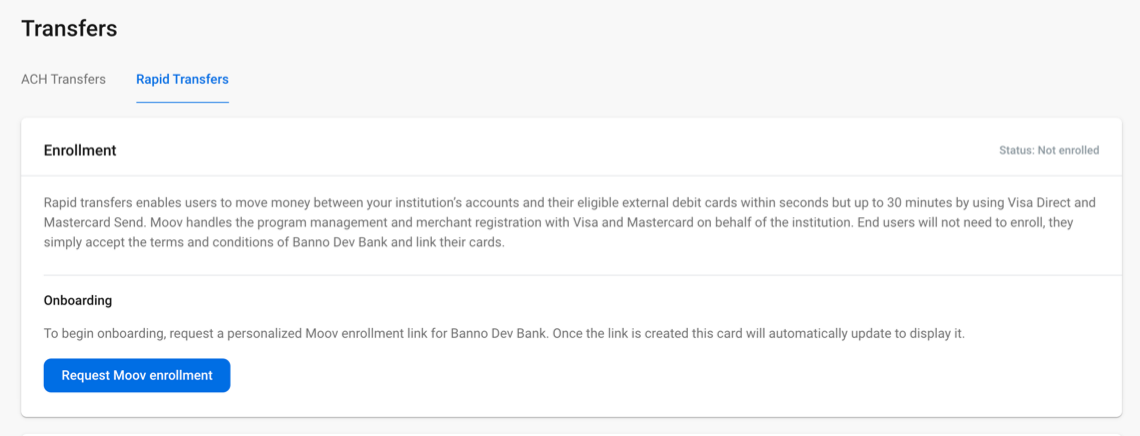
As you saw in the SLA sent on Friday, April 18, the onboarding links to enroll with Moov are now live in Banno People™. In other words, you can now accelerate your onboarding to gain access to Jack Henry Rapid Transfers once it's ready for release!

Onboarding steps

To get enrolled with Moov, follow these steps:

  1. Complete your core pre-work, using the previously emailed Compliance & Onboarding guide for your respective core: Symitar guide, SilverLake guide, or CIF 20/20 guide
  2. Navigate to Banno People to complete your Moov onboarding: Click the Settings dropdown, click Transfers, select the Rapid Transfers tab, and click Request Moov enrollment to create your personalized Moov link and get enrolled.

Why enroll with Moov right away? That's easy – so that you’re ready to offer Jack Henry Rapid Transfers and Merchant Acquisition the moment they're released!

Need a hand?

For more information on our partnership with Moov and the upcoming features this partnership will yield, check out the FAQs we compiled from the special-edition meetup on April 11, featuring Jack Henry Chief Technology Officer Ben Metz and Moov CEO Wade Arnold:

No additional contract or support ticket is required to onboard with Moov (or for the upcoming features), but please contact our support team if you need help or have any questions.

New Feature • Banno Business for Credit Unions • Banno Online™

Download Batch as Nacha or PDF

Our Banno Business credit unions' business members can now download an existing batch! Both PDF and Nacha file formats are supported. To download a batch, the member should click Download on the Batch detail screen and select their desired format. When describing the functionality to your members, it's worth noting that the PDF format supports sorting by a specific recipient field.

This feature is available to Banno Business credit unions on Symitar without NetTeller. No additional contract or support ticket is required.

New Feature • Banno Business for Banks • Banno Mobile™ and Online

Copy Batch

Now available to Banno Business banks on SilverLake, the Copy Batch feature lets your Banno Business users with the Create Batch permission for ACH batches duplicate an existing active batch on Banno Online and Mobile.

Batches in Ready or Uploaded or Initiated status also have a Duplicate option, which they can use to create an exact copy of the batch, including recipients! During the duplication process, the user is also prompted for a new batch name and whether to reset recipient amounts to zero during. After successfully duplicating a batch, the new batch should be visible in the batch list — note that the user who duplicated the batch will need to refresh the screen before the new batch is reflected in the list.

No additional contract or support ticket is necessary; your authorized business users should already have access to the feature.

New Feature • Banno Platform

International 2FA Code Delivery through ENS

As of April 15, 2025, we have completed the migration of international phone number support for 2FA codes through Jack Henry's Enterprise Notification System (ENS). The removal of Authy as a two-factor authentication (2FA) code delivery method is now complete.

Origination phone number

Recipients with a phone number based in the United Kingdom (UK) will now receive 2FA codes from a single UK origination number:
+44 7480 191787

All other 2FA codes will be delivered via ENS, using your financial institution's dedicated toll free number.

Initial enrollment and account recovery

During initial enrollment and/or account recovery, will remain a requirement that the user has a US-based phone number filed on the core, so Banno can validate the legitimacy of the user during these high-risk actions. This is particularly important to recognize for users with international phone numbers.

For more details on 2FA code delivery, don't miss Two-factor authentication article in the newly overhauled Security section on the Digital Knowledge Base!

Placeholder.
New Feature • JHA Treasury Management™

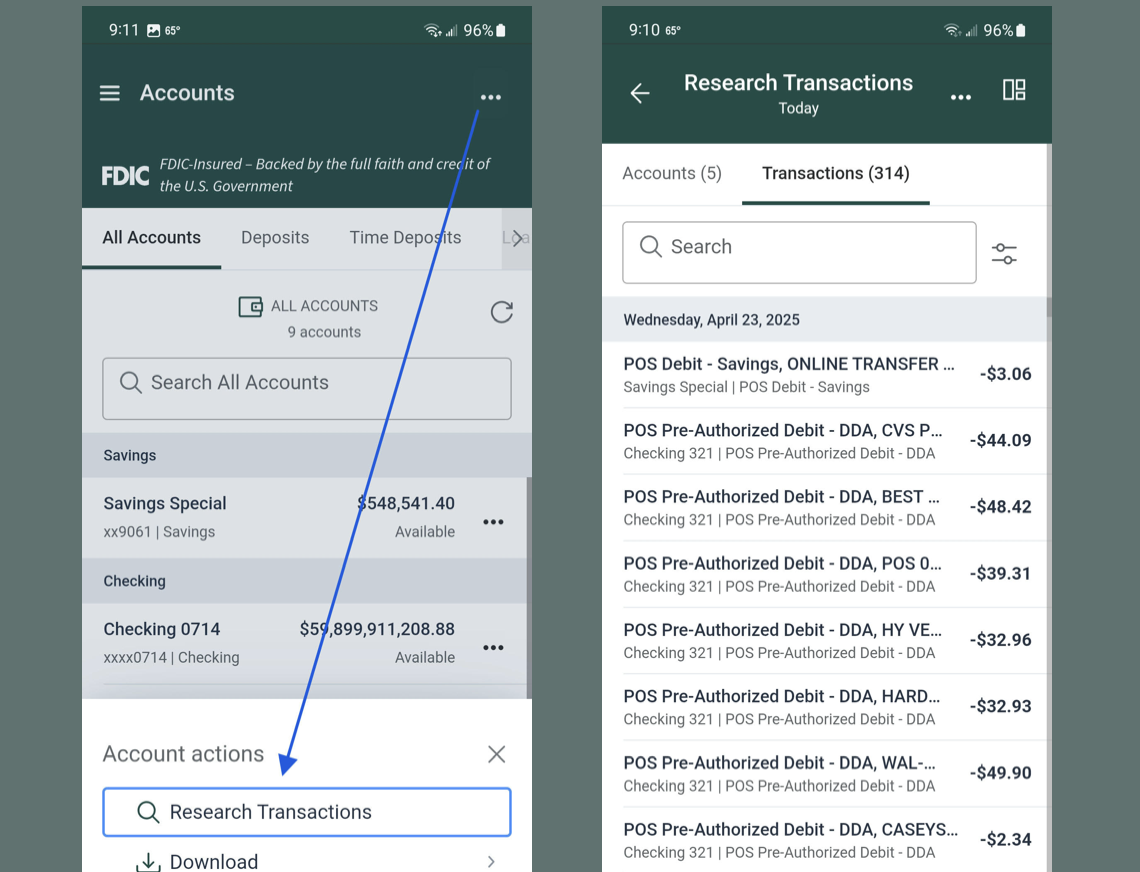
Research Transactions in Treasury Management Mobile Experience

Using the new Research Transactions feature for the Treasury Management Mobile Experience, your users can quickly get their account and transaction information on the go!

This feature is available now, so your end users can apply Advanced Filtering and use Type-to-Filter to locate specific transactions in mobile!

Placeholder.
New Feature • JHA Treasury Management

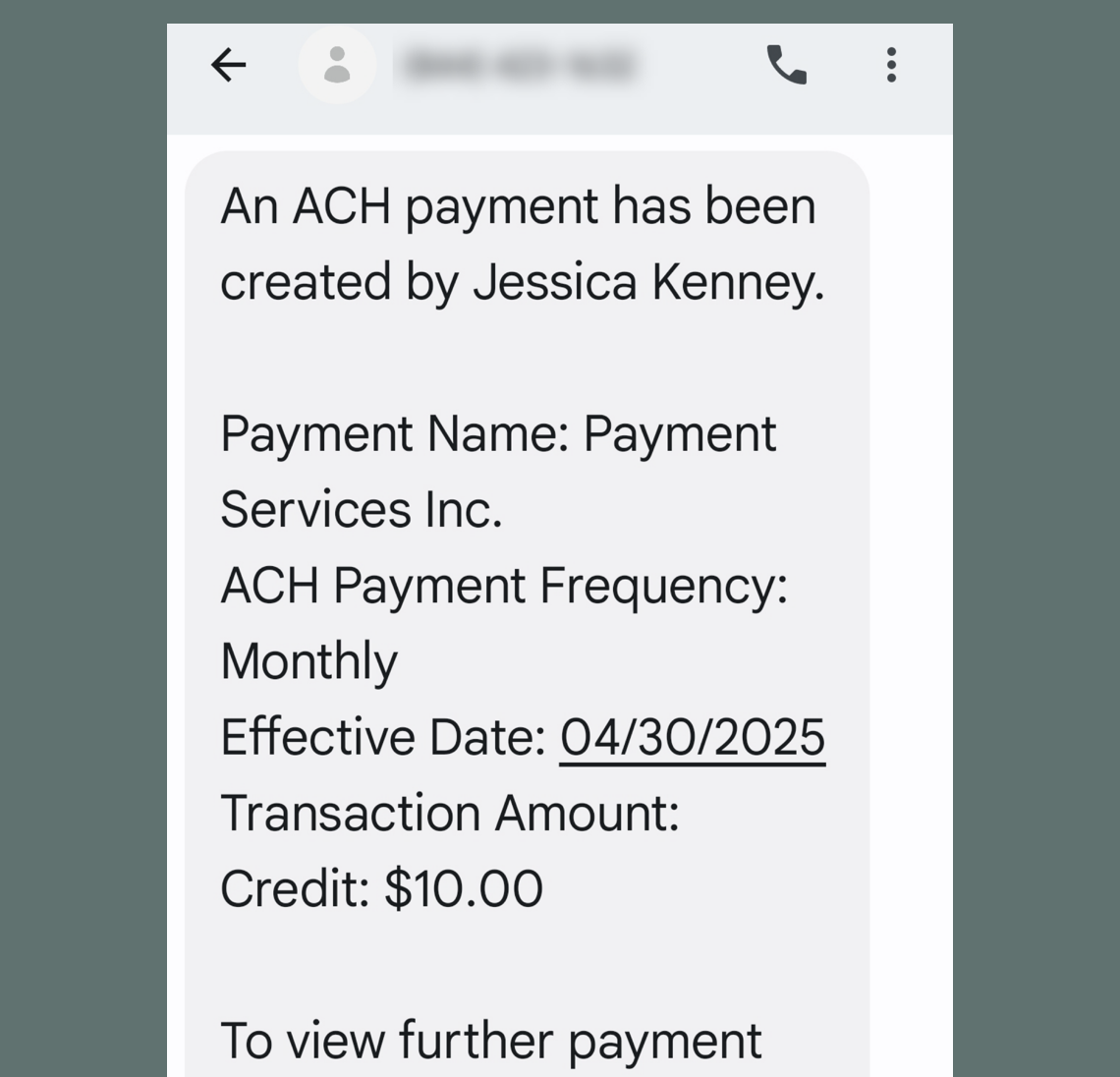
Now active! Additional details for Treasury Management notifications

Additional details have been added to all Treasury Management delivery methods – email, desktop, and text message. We’ve added all kinds of important and relevant information to ACH, Positive Pay, and Wire alerts, just to name a few!

Visit the ForClients Portal to check out the comprehensive list of notification details.

Heads up • Banno Platform

API scope management changes now in effect

The scope management changes for API development (first announced in October 2024) are now in effect.

After a series of deadline extensions (also described in previous editions of the Statement), the related scope selector is now available for your developers when reviewing or editing an external application's configuration settings in Banno People.

Here are a few things to know about the scope selector:

  • Adding new apps: Any consumer application added after the start date will require specifically defined scopes to function properly. Your in-house or third-party developers must select only the permissions the app needs to access user data.
  • Using existing apps: All apps created before the start date will be grandfathered in — i.e., these apps can continue to use all scopes without modification.
  • Editing existing apps: If a grandfathered app is edited or altered in any way after the start date, it will lose its grandfathered status. Before saving any changes, your team must define the scopes required and add them to your app's allow list.

For more information on managing your external applications in People, visit the Knowledge Base.

Heads Up • Apps

🎗️Forget-me-nots🎗️

We have a handful of important reminders for you this month.

Upcoming events

Register now for these upcoming virtual meetups:

You can also join one of our upcoming forums: Cybersecurity & Fraud + Digital Banking Forums

Banno Business Alerts coming soon!

As addressed last month, we are nearing closed beta testing of Banno Business Alerts and are currently compiling a list of Banno Business banks on SilverLake and CIF 20/20 that wish to become early adopters. If your bank is interested, please complete this survey so we can add you to the list.

Authy Migration completed

Banno users who had specified the Authy App as their preferred 2FA method have all now been seamlessly migrated to alternative 2FA methods (Voice and Text) on the ENS platform. These end users should now be receiving their 2FA codes from your financial institution's dedicated ENS phone number.

We also want to let you know that we've heard your feedback regarding the 2FA message itself; therefore, we will be restructuring the message to start with (rather than end with) this sentence: "We will never ask for this code - don't share it."

ISO 20022 conversion

As you know from the February Statement, we recommend that your end users download their existing wires templates before the July 14, 2025 ISO 20022 conversion deadline – at which point any FAIM-format templates will no longer be available.

For more details on downloading templates and everything else you need to know about ISO 20022, visit the ISO 20022 Resource Center on the ForClients Portal.

Reminder • Banno Mobile

Android Health Apps Declaration

On Monday, April 21, we sent an SLA requesting that your financial institution's Android Developer admin complete the Health Apps Declaration (via the Android Play Console), as a significant number of apps were rejected from publishing. Remember, your previously published app is still available in the Android store; however, new app versions, including Banno Mobile 3.22, cannot be published until your Health Apps Declaration is approved by Google.

We've found that the Android documentation Google provides is out of date. Not to worry! We've written simple instructions your developer can use: Open Play Console and log in, select your app, click Monitor and Improve, select Policy and Programs, click App content and complete your declarations.

After submitting the Health apps declaration, Google will review your information as part of the standard app review process. Once they approve the details, our engineers can publish new Android app versions on your behalf, as usual!

Heads Up • Digital Toolkit

Toolkit Corner: Full List of APIs

The Developer Relations team has added a new entry to the site navigation on JackHenry.Dev: Full List of APIs

This listing, along with the new entry in the site navigation, allows us to balance the need to 'have docs accessible for all publicly available APIs' with the need to highlight particular APIs in the main navigation.

Try to enjoy each API, equally.

Enhancement • Banno Mobile

Improved sync and error handling

If you missed the news in the most-recent Banno Release Notes, you'll be glad to know that we've made significant improvements to how our Mobile apps handle syncing and any related errors due to service interruptions or degradations:

  • Accounts and transactions: The apps will attempt to retrieve accounts and transactions if any errors occur when initiating a sync or during the API call for your institution details.
  • Account dashboard cards: If an in-house account is updated within an hour of the last successful sync, the apps will behave the same as previous versions. Otherwise, the apps will display the date and time of the most-recent successful retrieval of that account’s data.

These enhancements ensure that accountholders can still use key areas of Banno Mobile, even if certain sync services experience issues.

Placeholder.
New Feature • Banno Mobile and Online

Finicity Connect Return User Experience (RUX)

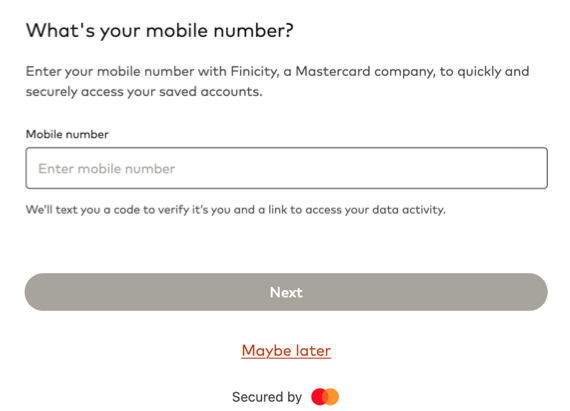
For customers who are using Finicity for third-party account aggregation, your accountholders will soon see a new feature inside the Finicity Connect experience. After opening Finicity Connect, they will see a new screen that prompts them to enter their phone number. This is not required; users can click Maybe later to bypass this screen and continue the aggregation process. If they decide provide their phone number, they will need to verify it via OTP, at which point the user’s account sharing choices are saved.

In the future, accountholders who have entered a phone number will be brought directly to a financial institution selection screen based on their previously shared accounts. They can then view all of their active data connections through a stand alone dashboard and will receive a link to the dashboard each time they link a new account with an RUX-enabled partner.

This new feature simplifies data sharing and enables the accountholder to securely share their financial accounts in subsequent sessions with fewer steps.

For more details, please see the Mastercard documentation.

Heads Up • Banno Platform

Database migration to Google Cloud Spanner

As part of our ongoing commitment to providing a secure, scalable, and highly available platform for your financial institution, we are upgrading our underlying database infrastructure to Google Cloud Spanner. This technology change is a critical step in transitioning to an active/active multi-region architecture and removes the need for scheduled downtime to perform database maintenance – all while letting us seamlessly scale our services to meet your end users’ growing demands.

This spring and summer, our engineering teams will migrate key data sets to Spanner. To ensure minimal impact on performance and availability, we will handle this migration during our regularly scheduled maintenance windows on Tuesday nights. While we don’t anticipate the need, should your financial institution experience any unexpected degradation or disruption due to this data migration, please report the issue to our Support team.

New Feature • Banno Mobile and Online

Addition of new high risk actions

As we've rolled out our high risk action functionality over the past year, fraudsters have been searching every nook and cranny for leaks, and we've been right on their trail plugging up the hull. As a result, we are now treating two new actions as high risk:

  • Member to member transfers
  • Create and edit travel notices

As of Mobile version 3.23, both of these activities are high risk actions, and Banno Online will follow suit in May. This of course means that these actions will be blocked by any of the high risk action blocking settings.

New Feature • Banno Platform

Scheduled external loan payments for credit unions

We’re excited to announce a brand-new feature designed to make managing external loan payments easier for your customers!

Starting today for credit unions, your members will be able to schedule transfers to and from their external loans - without leaving your digital banking platform. No more logging in every time a payment is due or worrying about missed payments. End users can set up recurring transfers (weekly, biweekly, twice a month, or monthly), view and edit their schedules, and enjoy greater control over their finances.

This update is available for both business and retail users and will help streamline loan payments, reduce manual work, and improve overall satisfaction.

Create a support case to get configured with scheduled external loan transfers.

Update • Banno Digital Platform

User type labeling: Initial results

Last month, we invited you to tell us how your financial institution refers to your various types of users. The initial poll results (41 responses) are in! The early data indicates that we should consider moving forward with the following user type nomenclature:

  • Non-commercial customers/members: Consumer
  • Commercial customer/members: Business
  • Groups of customer/members: Households

Data from over 40 financial institutions is a great start, but we'd love to hear from many more of our Digital Banking customers before solidifying new labels. If you haven't already shared your insights, please complete this form by May 15.

New Feature • Banno Mobile and Online

Hiding FSCC accounts

Currently available for our Full Service Credit Card (FSCC) customers, your authorized administrators can now manage account visibility for Banno through the CIF record! This feature is useful if you have any integration concerns — such as rewards or business management.

To prevent an FSCC account from displaying in Banno, your admins can enter ‘NB’ into the MISC 4 field of the CIF record.

Available to FSCC + Banno Business customers on SilverLake or CIF 20/20, this feature requires no additional contract or support ticket.

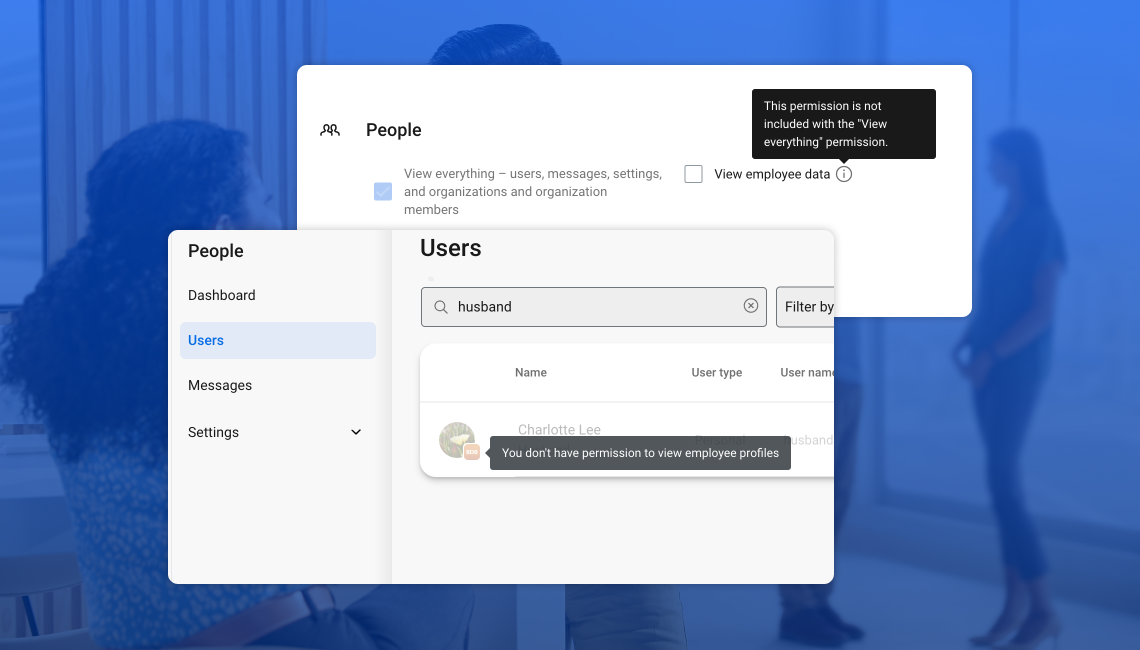
Screenshot of 'Employee data' permission in Banno People.
New Feature • Banno People™

View employee data permission: Next steps

As of April 15, the new View employee data permission is now available to all applicable institutions! Provided your institution is already configured to limit employee visibility of other employees' data, you now can see this permission within Users & Groups along with the other People permissions.

The legacy permission will be honored until Jun 30, 2025, giving you plenty of time to ensure your employees who need to view other employees have this new permission.

Pro tip: If you don’t have the list of users who need this permission handy, head to Banno Reports, request the Permissions report, and within the CSV file check out the “View employee data (legacy)” column to know who currently has the permission. This will make it easy to grant the new permission to those same users.

Coming Soon • Banno Mobile and Online

Anchor device verification beta continues

For those of you patiently waiting for your time to test anchor device verification for high-risk action blocking, stay tuned! This feature is actively being tested in a closed beta, and we’ll roll it out to everyone just as soon as it has been thoroughly vetted and is ready to roll.

We expect to wrap beta testing in the coming weeks, and we will make the setting available to everyone — no additional contract nor support ticket required.

Heads Up • Knowledge Base & Help Center

Documentation updates

Check out our latest Knowledge Base additions, including two incredibly informative new sections:

  • Moov: We added articles on all things Moov to our "Partner Integrations" documentation.
  • Security: We reorganized our Security docs for Banno Online and Mobile, including some net-new information.
  • Service & Support > Banno People > Security: Configuration docs for managing your financial institution's security settings are still housed in the "Service & Support" section.

Important reminder
Visit Help Center for how-to guides on all Jack Henry products.

If you have questions about anything you have read here, please contact Support.

Release notes are posted in the ForClients portal in advance of mobile releases and contain a rollup of all client-side changes made to Banno within the period.

]

Subscribe

join the club

Want to stay in the know about the latest features and enhancements we’re making to the Jack Henry Digital Banking Platform? Subscribe below and you’ll receive an email straight to your inbox every month when the Digital Banking Statement hits the press!

Subscribe

Switch to a better platform

Let's talk about what this could look like for your financial institution.

Connect With Us