Statements
see what’s new with our products
A Message From Our Team
Happy October! 🎃 Fall into our latest batch of updates designed to make managing your financial institution even smoother. This month, we're excited to highlight new features for the Banno Support app case queue, seamless browser-based key generation for developers, the launch of our new Origination Pilot & Beta Hub for lending and deposits, and so much more. Dive in below to see what's new!

Enhanced Default 2FA methods
Jack Henry is pleased to announce Enhanced Default 2FA – new functionality that gives all of our financial institutions the power to configure which level of security to enforce for end users' two-factor authentication (2FA) methods.
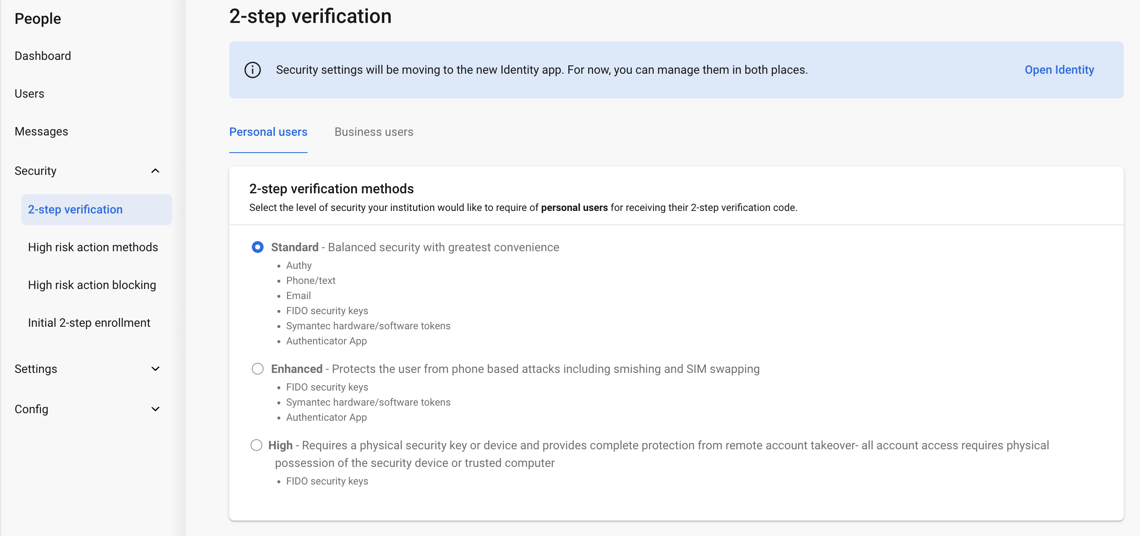
Default 2FA also offers customization based on user type (retail vs. business), as described in more detail in our 2-step verification Knowledge Base doc.
Why did we make this change? In a word… Security. Security. Security. Here are a few big benefits the Enhanced Default 2FA feature provides:
- Simplifies security management
- Improves security for high-risk actions
- Provides greater user and financial institution protection, while cutting down on individual back office configurations
As a critical part of these improved security measures, we will activate all 2FA methods for your financial institution with this release. We encourage you to begin testing FIDO keys as soon as possible.
Navigation Changes
With the introduction of this feature, we’re moving security settings to the primary navigation menu in People. So, rather than accessing security settings via the Settings dropdown menu, your authorized personnel can simply expand the Security dropdown to access three new screens – 2-step verification, High risk (to configure high risk actions and blocking), and Initial Enrollment.
Editable Security Settings
Your admins (with the Manage security settings permission) will also have the option to manage these 2FA settings in the new Identity App, which will be the long-term location for all security related settings. For more info, see the “Identity App – Unified Identity Service (UIS)” article directly below.
Authorized admins can manage security level requirements for your institution (i.e., Identity default), Banno product (i.e., user type defaults) and end-user overrides in both People and the Identity App (for now).
High-risk authentication can now be configured to use either a password or existing 2-step verification methods.
Affected Users
The new Default 2FA Methods will affect both personal users (often called retail) and business users, as well as your employees who are authorized to edit the 2FA settings. These admins can set different 2FA methods for personal users and business users based on your preferred security level (Standard, Enhanced, High) for each user type.
End users who are currently enrolled in (soon-to-be) unsupported 2FA methods will need to re-enroll in 2FA and select supported 2FA methods.
Note: These changes do not affect Treasury Management.
Feature Requirements
No additional contract or support ticket is necessary; however, this functionality requires Banno Mobile version 3.19 or later.
Important: Users on previous versions of our mobile app may encounter errors during high-risk actions, account recovery, and enrollment.
Release Timing
On January 31, 2025, we will begin enabling Default 2FA for all financial institutions.
To learn even more about these changes, please review this Security documentation on the Knowledge Base!