
Face unlock on Android, send verification codes, in-app review prompts, & more
Big month! The following updates are all offered to you without you needing to reach out to get them configured. Whoa! That doesn't always happen, and all of these updates are really exciting and impactful to you and your users.
Josh Sadler
Banno Product & Design, Sr. Manager Jack Henry & Associates
New feature • Apps
Face Unlock on Android
Once updated to Banno Mobile version 2.15, users with a Google Pixel 4 or Pixel 4XL will be able to unlock the app with the built in face unlock feature. This is brand new in the Android eco-system. So far, the only supported devices are the Pixel 4s, but we'll expand support to other devices with the required hardware as the technology matures. But dang, that's fast entry into the app.
Coming soon • Support
Case routing and automation
Next month, you will be able to create custom rules within Banno Support. These rules can be created for many different purposes, such as automatically routing a case to the appropriate person or team based on subject, notifying a support representative of a case that hasn’t been replied to, and much more. Additionally, users of Banno Support will start receiving emails when they are assigned to a case. Say goodbye to missed Conversations and manual assignment overhead!
New feature • People
Send verification code
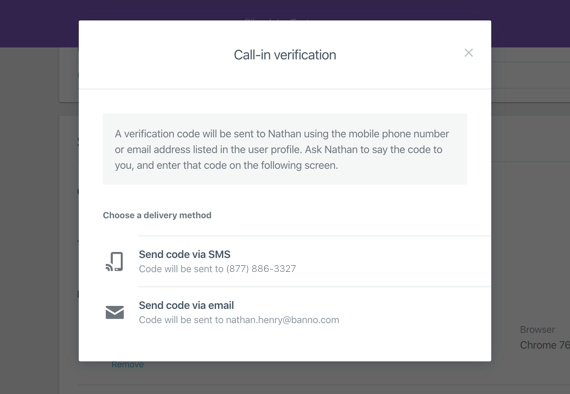
Earlier this fall, we announced the ability to send verification codes to users via email or SMS as a more secure way to validate their identity. We're pleased to say that this feature will be enabled for all this month. No need to contact us, and using the feature is a breeze: you choose whether to send their code via email or SMS and wait for them to recite the code back to you, at which point you enter it in a text field and submit. We'll let you know if the user was right or not.
Update • Support
Support inbox improvements
We’ve made a few changes to the Banno Support interface to make case management easier and more prominent, and to set the stage for features that are coming soon, like case tagging. Case status is now fully spelled out in the case list, and the user information section is collapsed to help focus on the information needed most.
Notice • People
Self-enrollment settings
This month we're opening up the ability for you to set a message to be shown on the enrollment view of your apps to spell out any restrictions, like disallowing enrollment to minors. We released this feature earlier in the year behind a separate configuration but now we're offering it as standard functionality with self-enrollment.
Heads up • Apps
Banno Online sign in updates
We sent a separate communication about the sign in updates we're bringing to Banno Online by the end of the year because it's just too much to summarize while tackling all questions. Here's what you need to know: Yes, it'll be awesome. No, you won't contact us to make the change. Sure, you can absolutely send Christmas cookies to my home address.
New features • People & Apps
Initiate password reset & user unlock
If you're live on Banno Online, then from Banno People you can send a magic link to a user via email or SMS that will allow them to change their password without requiring their old one. The magic link only works for a short period of time.
Also new, users that are locked out can unlock their accounts by completing account recovery. Alternatively, if they call you, you can unlock their account via Banno People without requiring a password change.
These will ship as standard features for all eligible FIs by the end of December. You won't need to contact us to take advantage of them.
New feature • Apps
Prompt for app review in-app
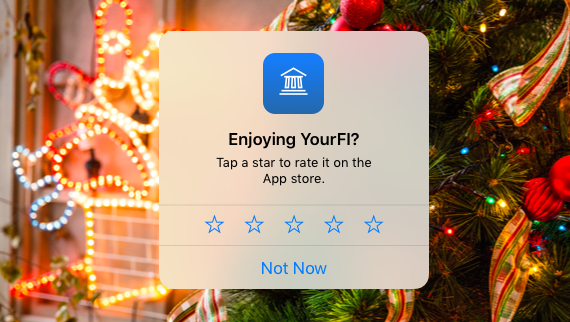
Waiting around for end users to take it upon themselves to review their banking app out of the goodness of their hearts? Wait no more! Based on positive triggers within the app, such as setting up payments, recurring transfers, and renaming accounts, Banno Mobile users will now be prompted within the app to provide a review of their banking app experience. As an FI, there is nothing you need to do, this feature will be turned on for all.
Heads up • Apps
Security update for cash management users
In early January 2020, we’re improving the security of Banno Mobile for cash management users. In October, we released the change that requires cash management users to reset passwords when needed or be blocked from logging in when dormant or locked. We now plan on enabling these same checks when a user triggers an app sync by signing in with a PIN or biometric authentication. This behavior has long been standard for retail users but was not available until recently for cash management users.
Heads up • Apps
Holiday release schedule & app submissions
Due to the upcoming holidays, we've decided to push our normal monthly mobile release schedule out a month, effectively skipping a release in January. Version 2.15 is available this month and we expect to roll out 2.16 in February.
Also, please be sure to periodically check your app store accounts if there are new agreements. We're unable to push new updates for you if you don't keep your accounts in good standing.
If you have questions about anything you read here, contact support.
Release notes are posted in the ForClients portal in advance of mobile releases and contain a rollup of all client-side changes made to Banno within the period.
Heads up • Apps
Banno Online sign in updates
What we're changing
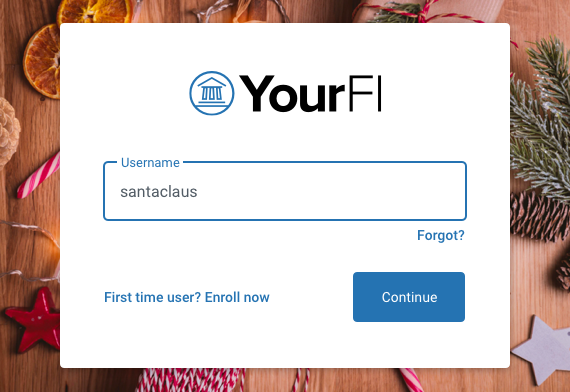
Username and password entry will be split into two separate steps. When a username is entered and submitted, either from the remote login on your website or the form embedded in Banno Online, we’ll check to see if that username and browser have enrolled in biometric login. If so, the user will be prompted to sign in with their biometric instead of their password, and if not, the user will be asked for their password followed by the existing two-factor authentication challenges they would encounter today.
We’re adding biometric support. Windows Hello on supported PCs, TouchID on MacOS, fingerprint sensors and facial recognition for mobile devices can now all be used to make signing in to Banno Online easier and safer. The same underlying tech, called Webauthn, will allow us to add hard token support in the future. Webauthn replaces the need to enter a password or complete a 2FA challenge and is amazingly secure.
Password managers will start working. Due to our choice to aggressively use the very latest in web technology, the major password managers were incapable of filling in credentials in Banno Online. We’re updating our form fields to make it possible for browsers and password managers to autofill saved credentials.
The change to split username and password entry and support for biometric sign in using Webauthn will ship by the end of December. You don’t need to request these updates as they will be applied across the board.
Heads up • Apps
Security update for cash management users
What's going to happen?
If a cash management user is in a locked status, when they sync in Banno Mobile they will see a message indicating their account is locked and be signed out of the app. When attempting to log back in, an error will display that the account is locked.
If a cash management user’s NTID is dormant, when they sync in Banno Mobile they will see a message indicating their account needs attention and be signed out of the app. When attempting to log back in, an error will display that the account is dormant.
If a cash management user’s password is expired or needs to be reset, when they sync in Banno Mobile they will be prompted to enter their current password (which is the temporary password if they were reset) and then create a new password.
Security at Banno is the single highest priority and we are constantly improving security for our users. This change will close a loophole that allows cash management users to improperly remain signed in while using Banno Mobile.
]
Subscribe
join the club
Want to stay in the know about the latest features and enhancements we’re making to the Jack Henry Digital Banking Platform? Subscribe below and you’ll receive an email straight to your inbox every month when the Digital Banking Statement hits the press!
Ready for a demo? Need pricing? Want to partner? Fill out this form and we'll be in touch. Looking for guides? Visit the Knowledge Base. Need to open a support case? Log in to ForClients.
How can we help?
Want to stay in the know about the latest features and enhancements we’re making to the Jack Henry Digital Banking Platform? Subscribe today to our monthly statement by providing your information, and a member of our team will ensure you’re added to the list.