Back to current statement

February 2026

Promoted Messages, Interstitials, and Deep Links • New Treasury Management Features • Identity Updates • Passkeys Enhancements • Plus More

Grinding Away the Winter

February is technically the shortest month on the calendar, yet somehow it feels like the longest stretch of the year. For our team, it’s been a “heads-down” season of refinements, from turning a new page as Banno Conversations evolves into Jack Henry Conversations to hearing first-hand stories from the businesses and non-profits using Tap2Local. I’m particularly excited for our credit union customers for the rollout of warning codes to restrict money movement and establish more automated control.

Seeing and hearing all your feedback on our roadmap is what makes the winter grind worth it. In this month’s Statement, I hope you see the steady progress we’re making to help your communities thrive, even if the groundhog isn't doing us any favors.

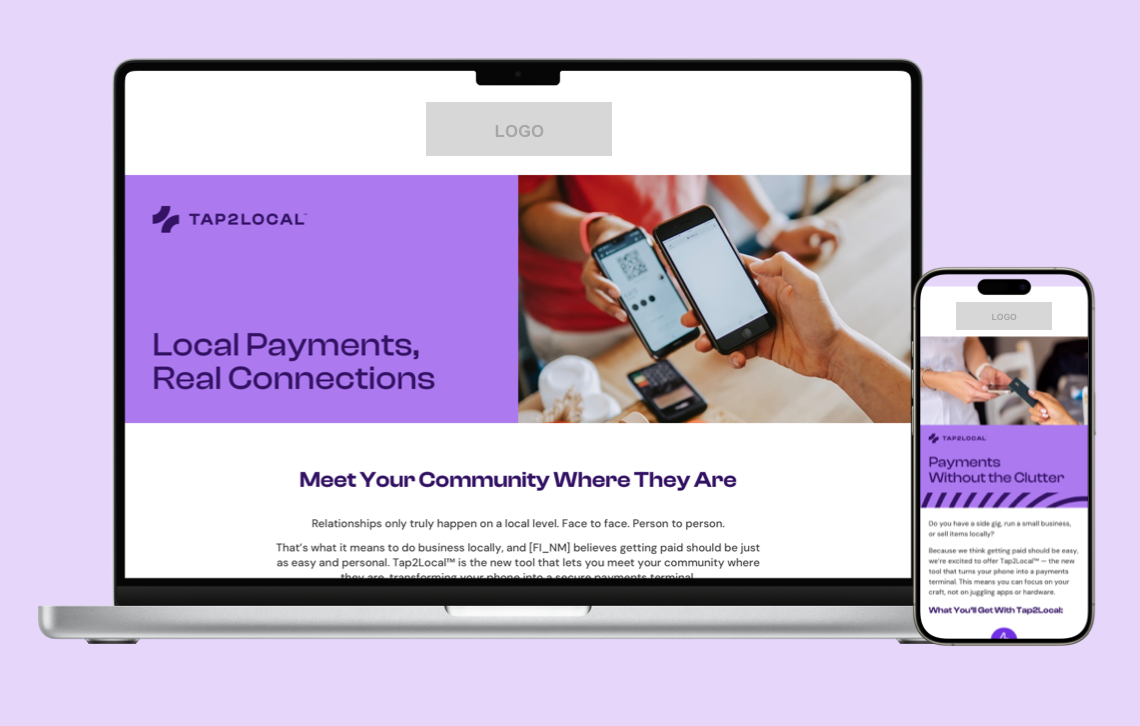
Promo image for Tap2Local campaign on Jack Henry Marketing Center.
Coming Soon • Jack Henry Marketing Center

Tap2Local Campaign

A new Tap2Local campaign is coming to the Jack Henry Marketing Center next month, giving you a turnkey way to promote secure, smartphone-based payments for local businesses. With emails, social content, digital banners, and more, you can equip your local business accountholders with the power to accept payments – without the headache of extra hardware or extra work for your team.

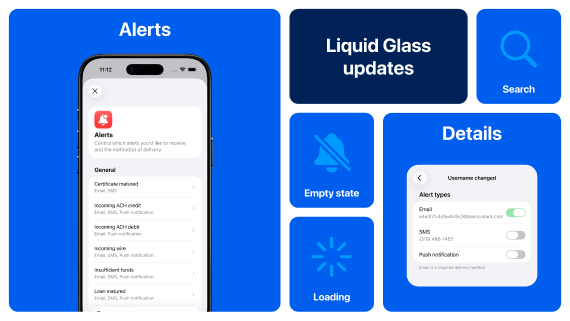
Collage of UX elements for Banno Mobile 3.32.
Heads Up • Banno Mobile

Mobile App UX Design Evolution

Banno Mobile version 3.32 is currently on target for submission to the app stores in early March – likely the week of March 9 - 13. The following provides a recap of the user experience (UX) design advancements you can expect in the next two iOS releases, along with an update regarding our progress on Android.

iOS – 3.32 Recap

The plans we shared last month for Mobile 3.32 on iOS remain largely unchanged. However, some of the transitional work around the money movement experience – i.e., implementing forms and layout styles consistent with Apple’s new Liquid Glass design system – will be finalized in Mobile 3.33. While users may notice some new UI styles during this transition, the fundamental flows will not be disrupted.

For more details and to learn about other upcoming changes, visit the iOS App UX Evolution Knowledge Base page.

Android – 3.32 Update

We have elected to move the majority of the UX design work we had planned for Mobile 3.32 to our upcoming Mobile 3.33 release. Not to worry, though. Once we lay some of the foundation for Material 3 in Mobile 3.33, we can quickly hit our stride and continue building momentum over the coming months.

You can follow the journey and plans here on our Android App UX Evolution Knowledge Base page.

New Feature • Banno People and Banno Online & Mobile

Promoted Messages, Interstitials, and Deep Links

To help you boost accountholder engagement and message visibility, the new Promoted Messages and Interstitials feature helps ensure that your most critical information is seen right there on the Dashboard, rather than sent to a crowded inbox. Plus, the ability to include deep links can more swiftly get your users where they need to go.

The feature provides a few key benefits:

  • Increased visibility: By delivering high-value, banner-style messages directly on the Dashboard, you can ensure that essential information reaches your accountholders the moment they log in.
  • Effective communication: These prominent placements are designed to drive end users to take essential actions, improving the overall effectiveness of your financial institution’s messaging.
  • Targeted reach: Your admins can leverage these promoted messages to deliver crucial information to the specific segments that need it most.
  • Smooth transitions: By including deep links to app features or external applications, your admins can send the right users to the right spots.

This functionality is included behind-the-scenes with Banno Mobile 3.31. Soon after Mobile 3.31.2 for iOS is available to download (as soon as March 3), we will enable this feature for all financial institutions. Once we do, you'll see it available in Banno Admin ( → PeopleMessages) and ready to use – whenever your team is ready!

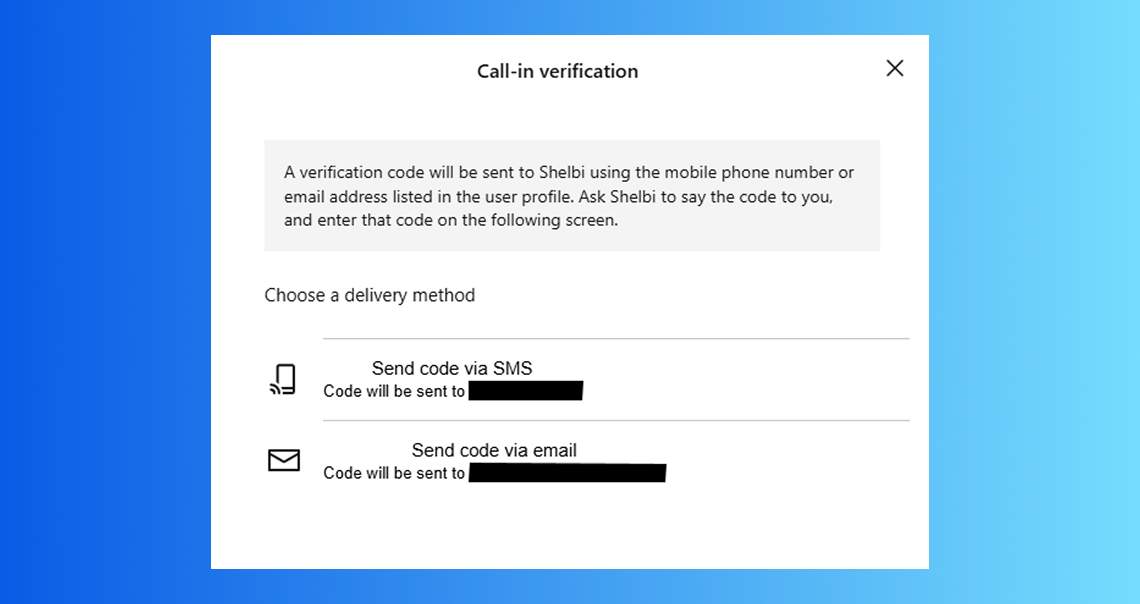
Screenshot of Call-in verification screen for UIS users.
Coming Soon • UIS • Banno Admin & Treasury Management

Identity App: Call-In Verification

Soon, users with Unified Identity Service (UIS) will be able to use Call-in verification – an advanced security process that lets users quickly and securely verify who they are by providing a One Time Passcode (OTP) while on the phone with your support staff.

The verification is performed through the mobile or online banking application using Email or SMS verification. This enhances security by ensuring the caller is who they claim to be. We aim to release this feature mid-March.

As a future enhancement to this UIS-specific feature, we are building toward using High Risk Action (HRA) prompting in place of Call-in Verification; that additional enhancement will completely circumvent the need for your team to ever ask for a code that was sent to the user!

Important: This functionality is intended for UIS users, and therefore it is not recommended for Banno-only financial institutions. For users with access to Banno Messages, we strongly encourage the use of the verification with HRA method.

New Feature • UIS • Banno Online & Mobile

Security Profile Enhancements

We’ve modified the Security screens for Banno Online and Mobile, making it easier than ever for your end users to manage their identity and security settings. These enhancements went live on February 24.

Think of the Security screen as a user’s new Identity Profile. The streamlined interface empowers users to handle their own login and recovery options – without needing to call your support team.

Here's what’s new for end users with UIS:

  • Self-Service Recovery: Users can now maintain their own recovery email and phone numbers directly within the app.
  • ID Details at a Glance: Users can now view the specific ID details that were collected during their initial enrollment.
  • Expanded Access: UIS users who don't currently utilize other Banno products will now have standalone access to these Security screens.

This update is all about giving your users more control over their digital identity while reducing friction for your frontline staff.

Important: While the Security screens are open to all UIS users, the full Profile screens remain exclusive to your Banno users. Please also note that the password reset functionality is not yet available to Treasury Management users.

Coming Soon for CUs • Banno People

Restrict Money Movement with Warning Codes

Coming soon, authorized credit union employees will have the ability to restrict member access to specific digital banking features using warning codes configured in Symitar.

By mapping these codes to restrictions in Banno People, your authorized employees can automatically disable features like Zelle®, ACH, wires, and external transfers for memberships flagged with specific status codes.

This feature is currently in closed beta testing; please continue to check the monthly Statement and/or the Monthly Digital Banking Meetup for an announcement regarding its general availability.

Coming Soon • Banno Business Banks • Banno Online

Future Dated Wires

We want to provide an update on the Future Dated Wires feature that we announced, in the December Statement, is coming soon for Banno Business users on SilverLake.

Currently in beta testing, this feature will let your business users schedule wire transfers for a specific date in the future. This is designed to give users greater control and flexibility when managing their business payments, helping them streamline operations and support more effective financial planning.

Look for additional updates here in the Statement and/or the Monthly Digital Banking Meetup as we prepare for the full release!

Heads Up • Jack Henry

🎗️Forget-Me-Nots🎗️

Don't miss these upcoming events:

Tap2Local + Rapid Transfers Events

Remember, you have a standing invitation to join key subject matter experts (SMEs) from Jack Henry and Moov for these upcoming events!

Stay in the Know!

To receive SLA emails for all things that matter to you, head to our Subscription Manager and subscribe accordingly. Please also spread the word with your colleagues, so your whole team gets the respective SLAs that matter to each of you!

Heads Up • Banno Digital Toolkit

Toolkit Corner: Cloud-Native Tech and the Art of Modernization

What pairs well with the Banno Digital Toolkit? Meet the future of core.

Check out the Digital Core API docs to see how we’re unbundling the core and modernizing with cloud-native technology. It’s all about building a flexible, adaptable ecosystem that’s ready for whatever comes next.

Dive into the docs at JackHenry.Dev.

New Features • Jack Henry Platform

Jack Henry Wires

To reduce operational friction, JH Wires has introduced an Override Account permission to resolve beneficiary account errors. Currently, incoming ISO 20022 messages (pacs.008 and pacs.009) can fail core validation due to malformed account details, even after passing Fed and OFAC screenings. Authorized users can now input a corrected account number, which automatically triggers a validation retry. For full traceability, the system captures all actions in the audit log and retains the original account data for return processing.

In addition, new document capabilities are being delivered to production soon, including the ability to download a PDF of the wire list based on applied filters, as well as an enhanced printed form export that generates a fully populated PDF with all wire details, disclaimer language, and institutional logo. Work also continues on international wire capabilities as part of our ongoing roadmap to expand functionality and support evolving client needs.

Follow Up • Banno Mobile

Device-Level Authentication

The transition to device-level authentication in Banno Mobile 3.31 initially replaced the in-app PIN screen with more modern, built-in device-level security features (device passcode or biometrics). As you likely know from our SLA communication, we have re-introduced the in-app PIN screen, giving your end users additional optionality. The in-app PIN screen is included in Banno Mobile 3.31.2 – available now for Android and landing for iOS as soon as Tuesday, March 3.

You'll find supporting documentation for the new authentication flows on the For Clients Portal, toward the bottom of the Banno > Documentation page. Here are direct links to open the PDFs:

Clarification on Updated Functionality

In our previous Statement from December 2025, we stated that end users who opt out of device-level security would be required to log in after 5 minutes of inactivity. We want to clarify that there is a difference in how this inactivity period is applied, based on the operating system (OS).

For Android users, regardless of the authentication method they choose, the authenticated session is maintained and will only prompt for re-authentication after 5 minutes of inactivity. This change was implemented to improve the user experience by preventing the near-constant need to re-authenticate for common tasks that temporarily take the user away from the app (like retrieving a 2FA code).

For iOS users, those who select Device passcode / biometrics or In-app PIN (when initially setting their unlock methods for the app) must unlock the app every time it is launched or returns to the foreground. The 5-minute inactivity period applies only to devices that do not have a device passcode set. Any iOS users who rely on the in-app PIN (or who choose not to use the lock screen) must re-authenticate each time the app is launched; however, the existing session remains available if the user leaves the app (without closing it) and then returns to the app within 5 minutes.

This difference between iOS and Android functionality is due to our native builds for each OS and how each OS manages app lifecycles on the device.

New Feature • Banno Online & Mobile

Passkeys Enhancements for Client Applications

The upcoming Mobile 3.32 release introduces additional support for Passkeys, a major step in enhancing security and the related UX across our digital banking platform (mobile and online). End users have had passkey options during the login process (autofill) since the Mobile 3.28 release, and Mobile 3.29 gave them the choice to use passkeys in place of their password. After upgrading to Mobile 3.32, they can use passkeys as a Two-Factor Authentication (2FA) method and to authenticate during Account Recovery.

With Mobile 3.32, passkeys will also be leveraged for High-Risk Actions (HRA), providing a more secure, streamlined verification method for sensitive transactions or changes in the app.

These enhancements move us toward a cleaner and clearer token management experience for end users. The work also reflects our persistent goal to offer the best, safest authentication methods possible. Passkeys and existing security tokens will be grouped and updated with FIDO-suggested iconography for a clearer user interface. This includes listing passkeys and security keys together in the enrolled 2FA methods list, and we will eventually remove the existing Passkey section from Security Settings.

Note: We are currently working on supporting documentation, which we will provide before Mobile 3.32 is available to download.

Heads Up • Banno Business Banks

Your Feedback Needed!

We are gathering insights on the steps your financial institution takes when setting up new business customers, specifically regarding how CIF records are established in SilverLake and CIF 20/20 cores. Your feedback will directly influence the development of Banno Business self-enrollment, ensuring that our solution alleviates manual tasks for your team and frees them to focus on higher-priority initiatives.

Please provide your feedback and help us build a solution that meets your needs.

Enhancement • Banno Business CUs • Banno Online & Mobile

Address Support for CU Banno Business Users

Banno Business users can now enter their personal addresses directly within the app. While this information is currently member-facing only, a future update is planned to provide credit union employees full visibility into these address details as well.

Coming Soon • Banno Admin

Suspending Users

Coming soon, your authorized administrators will have the option to suspend inactive digital banking users, when necessary, directly within the Banno People platform. This new feature provides your employees with another tool to assist in maintaining your digital user base.

New Feature • Treasury Management

Now Available! Data Hub for Treasury Management

Data Hub is now Generally Available!

We’re thrilled to announce that Data Hub has officially reached General Availability – and we can’t wait for you to experience everything it brings to your Treasury Management operations. This is your moment to unlock faster insights and operational efficiencies.

Ready to get started? Reach out to your Account Executive today to review contract details and take the next step toward activating Data Hub for your bank. Let the data-powered fun begin!

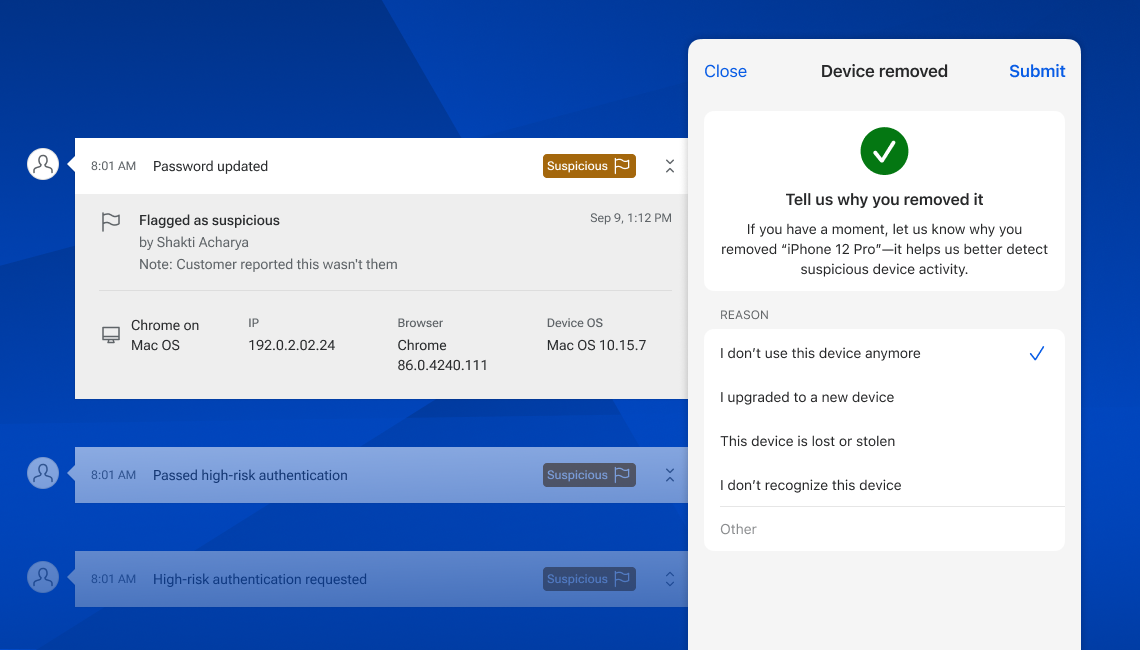
Image showing two aspects of the Suspicious and Fraudulent Event Labeling feature.
Coming Soon • Banno Platform

Suspicious and Fraudulent Event Labeling

Just ahead of rollout, below is a recap of what to expect for these upcoming fraud-fighting features. For more context, you can also check out our initial announcement.

History Events

Within Banno People and Identity, your designated staff will soon be able to mark history events as suspicious or fraudulent as well as add notes to aid in any ongoing investigations or when reviewing past events. So your administrators can grant access to the right staff members, we're developing three related permissions: View labels, Manage suspicious labels, Manage fraudulent labels.

The ability to label history events will be rolling out to all institutions in the coming weeks – and you can rest easy knowing nothing will change for your staff until you enable the permissions noted above.

Device Removal Reasons

In Banno People and Identity, as well as within Online and Mobile, we’ll be asking for reasons when a device is removed. This will be optional on the consumer apps (for all accountholders) and required when removing devices from Banno People. Learning why devices are removed will help us identify risky patterns of activity so we can be better equipped to prevent fraud in the future.

We’ll begin asking for these reasons for all institutions in Mobile version 3.33 (targeting early April), and it’ll hit Online around the same time. We’ll also start asking your staff to provide these reasons within the next few weeks.

Heads Up • Knowledge Base

Documentation Updates

Here are just a few of this month's more notable documentation updates. Also, note that due to browser behavior, PDF links may open directly in this same browser tab:

  • Unified Identity Service: Learn details related to the new Recovery Email and Phone fields for end users' security settings.
    Important: Please note that password reset functionality is not yet available to Treasury Management users.
  • Stablecoin FAQ: View this helpful FAQ summary document based on questions received during our February 13, 2026 Around the Corner with Greg Adelson meetup, which focused on stablecoins.
  • Product Enablement Services: Read, download, and share our new product collateral for Product Enablement Services.
  • Rapid Transfers on the Knowledge Base: See newly updated information on our Rapid Transfers page, from helpful link additions and FAQs to surfacing cost information.

Conversations Documentation

As we continue to enhance the Banno Conversations feature you know and love, soon we will update the name referenced in documentation from "Banno Conversations" to "Jack Henry Conversations." Nothing else is changing immediately, but this shift in name will help avoid potential confusion and ambiguity as the Conversations experience next expands to support our Treasury Management platform.

If you have questions about anything you have read here, please contact Support.

Release notes are posted in the For Clients Portal in advance of mobile releases and contain a rollup of all client-side changes made to Banno within the period.

]

Subscribe

join the club

Want to stay in the know about the latest features and enhancements we’re making to the Jack Henry Digital Banking Platform? Subscribe below and you’ll receive an email straight to your inbox every month when the Digital Banking Statement hits the press!

Subscribe

Switch to a better platform

Let's talk about what this could look like for your financial institution.

Connect With Us